Filter in place, without leaving Photos
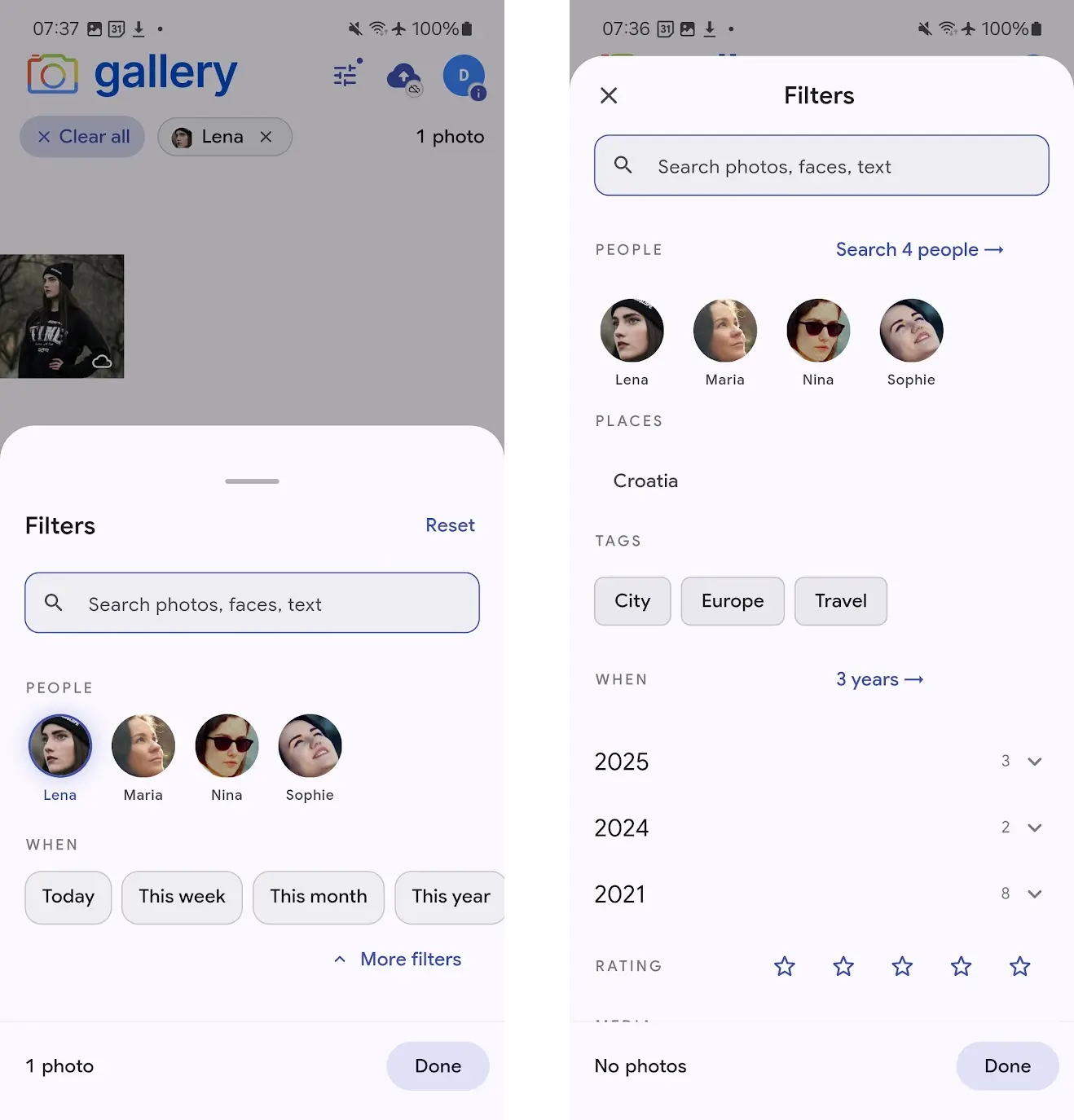
The Photos tab used to be a single long timeline. If you wanted to find the photos of one person at one place in one year, you'd leave Photos, jump into Search, run a query, and come back. Now a filter sheet docks at the bottom of the Photos tab itself — tap the filter icon in the app bar and the sheet rises into view, never hiding the grid it's filtering.
Select a person, a place, a date range — the grid above the sheet re-queries as you pick, and the active filters land as chips along the top. The photo count updates too, so you always know how many results your current filter matches before you dismiss the sheet to browse them.
Three snap points, from glance to deep dive
The sheet has three heights. Peek sits at the bottom of the screen as a thin strip of active-filter chips — a glanceable summary of what's filtering the timeline, with a Clear all affordance and a tap to expand. Browse is the default — the two facets you reach for most (People faces and When presets — Today, This week, This month, This year) plus a debounced search field. Deep is the full picker: People, Places, Tags, a year-by-year When cascade, Rating, and Media type, all reachable by dragging up or tappingMore filters.
Snap positions are draggable and flick-able — the sheet responds like the ones you already know from Maps and Files. The underlying timeline never pauses; drag over a photo in the visible area and it still opens in the asset viewer.
Faces, country→city, year→month
People show up as face thumbnails in a wrappable grid — tap to include. Places cascade from country to city: pickCroatia, and the city list narrows to cities in Croatia where you actually have photos. When aggregates by year with a photo count per year, and each year expands to a month list — so you can scope a filter to "June 2024" in two taps without a calendar picker.
Every list is populated from your real library. If you have no photos from a year, that year doesn't appear. If you have no videos, the Videos button isn't there. The sheet only ever shows filters that return results.
Search runs side-by-side with filters
The search field at the top of the sheet runs Gallery's full smart search — CLIP semantic matching plus text-in-image OCR — and the results compose with whatever filters you've set. Type beach with Lena selected and you get photos of Lena at the beach. Clear the search text and the filter-only timeline snaps back.
Keystrokes are debounced so each character doesn't fire a request, and the timeline uses a stale-while-revalidate pattern — the current grid stays visible while the new results load, then cross-fades in when they arrive.
Active filter chips that match the sheet
Every filter you set becomes a chip at the top of the Photos screen: the person's face for People, a globe for Places, a tag icon for Tags, a calendar for When, stars for Rating. Tap the × on any chip to remove that filter — the sheet updates in lockstep, and the timeline re-queries. A Clear all chip at the left of the row wipes the filter in one tap and collapses the sheet back to its hidden state.
When the sheet is at Peek, the chips are the sheet — a minimal reminder of what's active, sitting out of the way of the grid. You're never more than a single tap away from editing or clearing a filter.
Dark mode, accessible targets, one sheet to learn
Every touch target in the sheet hits the 48dp minimum, scrim tap behavior follows Material 3 (Deep collapses to Browse, Browse collapses to Peek), and dark mode is a first-class theme — not a tint pass. The sheet ships on iPhone and Android from a shared Flutter provider layer, so both platforms stay in lockstep going forward.
Where to get it
iPhone: install Noodle Gallery for iPhone from the App Store — the filter sheet is live in the current release.
Android: the feature is fully built and ships in the same Flutter codebase — the Play Store listing is still under Google review. In the meantime, sideload the latest APK fromGitHub Releases to try the filter sheet today; the Play Store version will catch up as soon as review clears.
Still shipping — more improvements incoming
This is the first release of the filter sheet and active development continues. On the near-term list:Camera filter restoration, a fuller Places picker, Tags searchinside the Deep snap, and filter-aware suggestions so the facets narrow each other the way they already do on the web. Parity with the web interdependent-filteringexperience is the target.