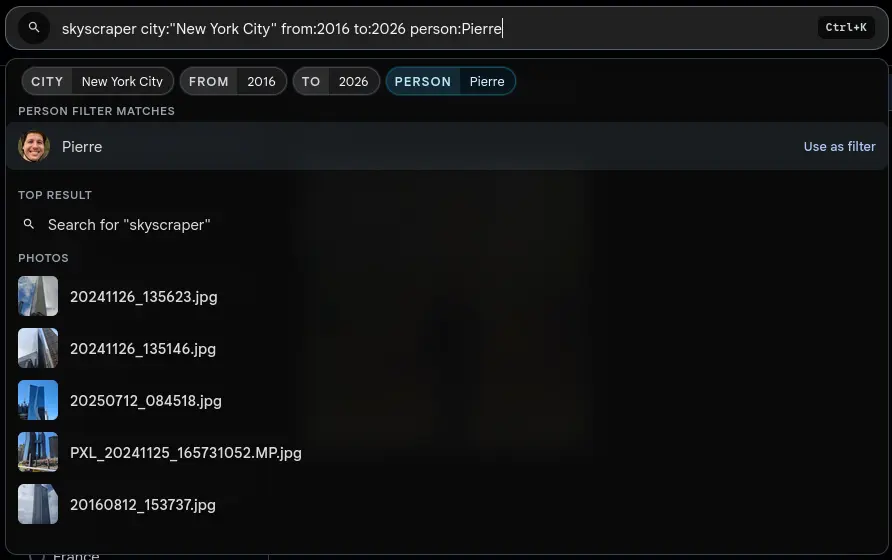
Type filters straight into the search bar (people, tags, dates, locations, ratings, media type, favorites, cameras) with live suggestions before you press Enter.
Gallery already had a deep filter panel. Inline search filters put it in the keyboard flow, so you can type a normal search phrase and add structured filters right beside it:beach person:anna tag:travel country:Germany from:2025.
Plain words stay the search query. Recognised tokens become filters. Enter commits everything together, so the page either updates with the full search or the palette stays open and shows what needs fixing.
What you can search for
Mix normal search words with typed filters in one query. For example:skyscraper city:"New York City" from:2016 to:2026 person:Pierre.
person: or people:named people, including global people across accessible spaces
tag: or tags:asset tags such as travel, family, work, or nature
city: and country:places, with quotes for names like "New York City"
from: and to:years, months, or exact dates like 2026, 2026-05, or 2026-05-12
camera:camera makes or models found in your library
type:photo, image, or video
favorite:true, false, yes, no, 1, or 0
rating:ratings from 1 to 5
Repeat person: and tag: to combine several people or tags. Plain words likeskyscraper or nature keep running as the normal search phrase.
Live suggestions while you type
People, tags, countries and cities get their own suggestion rows while the cursor sits inside the token. Choosing a row rewrites only that token to the canonical value, such as person:"Anna Maria", and leaves the rest of the query intact.
Suggestions apply filters and do not navigate away. The normal search providers keep running from the plain query text, so the palette stays useful while you refine the filter side.
Shareable URLs, visible chips, same filter panel
Committed filters serialise into readable URL parameters for Photos and Spaces. Refresh the page, use browser history, or send the link to someone with access, and Gallery rebuilds the same people, tag, date, location, camera, favorite, rating, media-type and album filters.
The chips and the filter panel stay in sync with the search bar. Remove a chip and the matching URL parameter goes. Clearing filters leaves unrelated page state alone.
Scoped to where you started
Inline filters respect the searchable page you are on. Submit from Photos and Gallery searches the full accessible timeline. Submit inside a Space and person suggestions, filters and results stay scoped to that Space, unless the global view explicitly supports the wider timeline.
Location filters got sharper too. City search can look beyond the first capped list, keeps selected cities visible, and scopes city suggestions to the selected country when there is one.
More practical filters
The release adds the missing album-state filter. You can now find assets with no album from the web filter flow, and the same URL-driven model keeps those active filters shareable where the page supports them.
It all runs on Gallery's existing filters and permission checks, and lands on the existing result pages. The path from thought to result is just shorter.