Filter in place, without leaving Photos
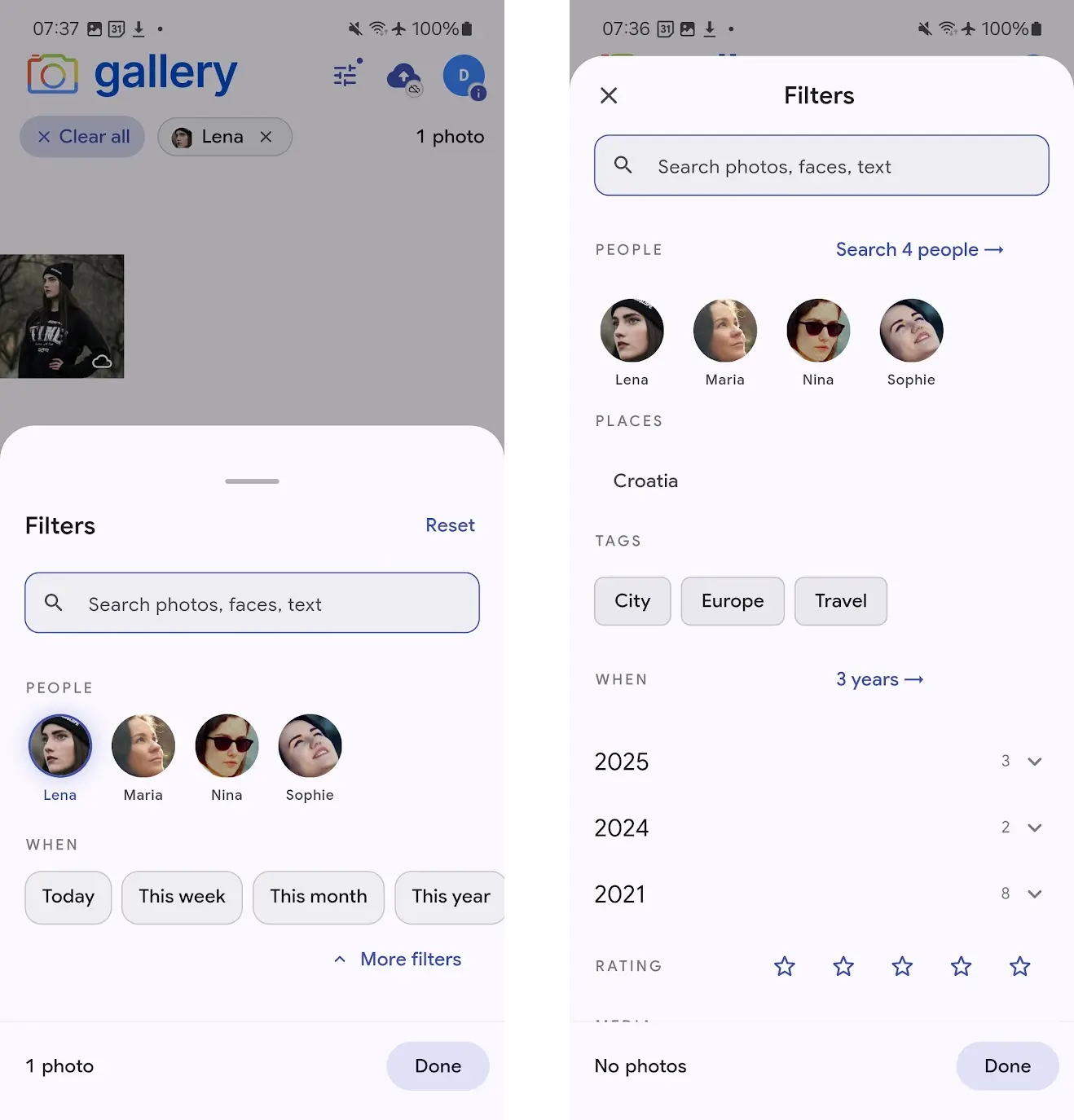
The Photos tab used to be a single long timeline. Finding the photos of one person at one place in one year meant leaving Photos, jumping into Search, running a query and coming back. Now a filter sheet docks at the bottom of the Photos tab itself: tap the filter icon in the app bar and the sheet rises into view, never hiding the grid it is filtering.
Select a person, a place, a date range, and the grid above re-queries as you pick. The active filters land as chips along the top, and the photo count updates, so you know how many results you have before you dismiss the sheet to browse them.
Three snap points, from glance to deep dive
The sheet has three heights. Peek sits at the bottom of the screen as a thin strip of active-filter chips, a glanceable summary of what is filtering the timeline, with a Clear all affordance and a tap to expand. Browse is the default: the two facets you reach for most (People faces, and the When presets Today, This week, This month and This year) plus a debounced search field. Deep is the full picker, with People, Places, Tags, a year-by-year When cascade, Rating and Media type, reached by dragging up or tapping More filters.
Snap positions are draggable and flick-able, so the sheet behaves like the ones you already know from Maps and Files. The underlying timeline never pauses. Drag over a photo in the visible area and it still opens in the asset viewer.
Faces, country to city, year to month
People show up as face thumbnails in a wrappable grid: tap to include. Places cascade from country to city, so picking Croatia narrows the city list to cities in Croatia where you actually have photos. When aggregates by year with a photo count per year, and each year expands to a month list, so "June 2024" takes two taps and no calendar picker.
Every list is populated from your real library. No photos from a year and the year is not there. No videos and the Videos button is not there.
Search runs side-by-side with filters
The search field at the top of the sheet runs Gallery's full smart search, CLIP semantic matching plus text-in-image OCR, and the results compose with whatever filters you have set. Type beach with Lena selected and you get photos of Lena at the beach. Clear the search text and the filter-only timeline snaps back.
Keystrokes are debounced so each character does not fire a request, and the timeline is stale-while-revalidate: the current grid stays visible while the new results load, then cross-fades in when they arrive.
Active filter chips that match the sheet
Every filter you set becomes a chip at the top of the Photos screen: the person's face for People, a globe for Places, a tag icon for Tags, a calendar for When, stars for Rating. Tap the × on any chip to remove that filter. The sheet updates in lockstep and the timeline re-queries. A Clear all chip at the left of the row wipes the filter in one tap and collapses the sheet back to its hidden state.
When the sheet is at Peek, the chips are the sheet: a minimal reminder of what is active, sitting out of the way of the grid.
Dark mode and 48dp targets
Every touch target in the sheet hits the 48dp minimum, and scrim tap behaviour follows Material 3: Deep collapses to Browse, Browse collapses to Peek. Dark mode has its own theme. The sheet ships on iPhone and Android from a shared Flutter provider layer, so both platforms stay in lockstep going forward.
Where to get it
iPhone: install Noodle Gallery for iPhone from the App Store. The filter sheet is live in the current release.
Android: the feature is fully built and ships in the same Flutter codebase, and the Play Store listing is still under Google review. In the meantime, sideload the latest APK fromGitHub Releases to try the filter sheet today; the Play Store version will catch up as soon as review clears.
Still shipping
This is the first release of the filter sheet and active development continues. On the near-term list:camera filter restoration, a fuller Places picker, Tags searchinside the Deep snap, and filter-aware suggestions so the facets narrow each other the way they already do on the web. Parity with interdependent filtering on the web is the target.